Move to KACE Cloud from another MDM provider
Prerequisites
If you are a trial KACE Cloud user, or want to replace your MDM provider with KACE Cloud, complete the following steps to enroll your device into KACE Cloud:
- Perform a factory reset of the device.
- In Apple Business Manager, assign the device to a KACE Cloud MDM server. See Link KACE Cloud with Apple DEP.
- In KACE Cloud, create and assign a default DEP profile to the DEP enrollment. See Assign KACE Cloud DEP profiles to Apple devices.
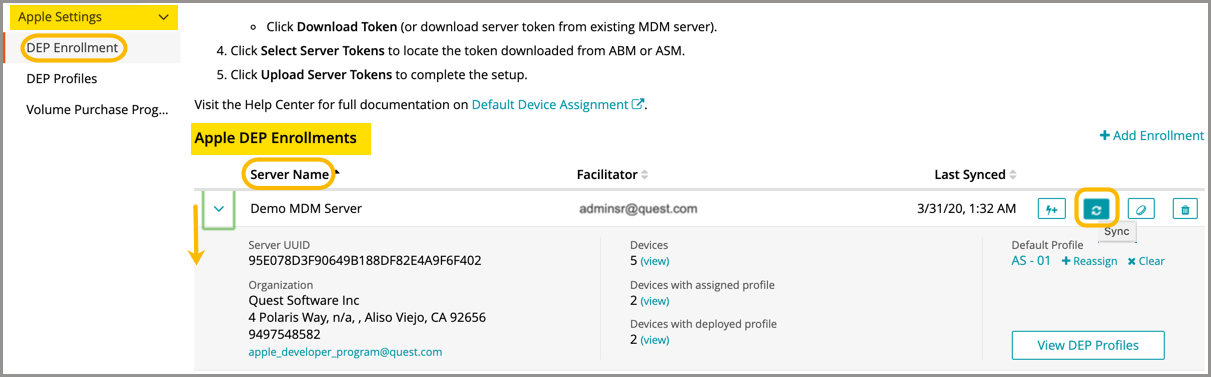
- Force a sync between KACE Cloud and the Apple DEP portal to pull the changes made to the linked server.
- Navigate to Settings > Apple Settings > DEP Enrollment.
- In the Apple DEP Enrollment section, expand a server entry, and in the Last Synced column, click Sync.
- Verify that the device has the DEP profile assigned.
- Select the Devices tab in top navigation.
- Select a device from the list.
- In the right panel, click Device Details, and in the Auto-Enrollment section, review the DEP settings.
- Perform a factory reset on the device and complete auto-enrollment, when prompted.